
Steel Grating Submittal Pack: Drawing Review
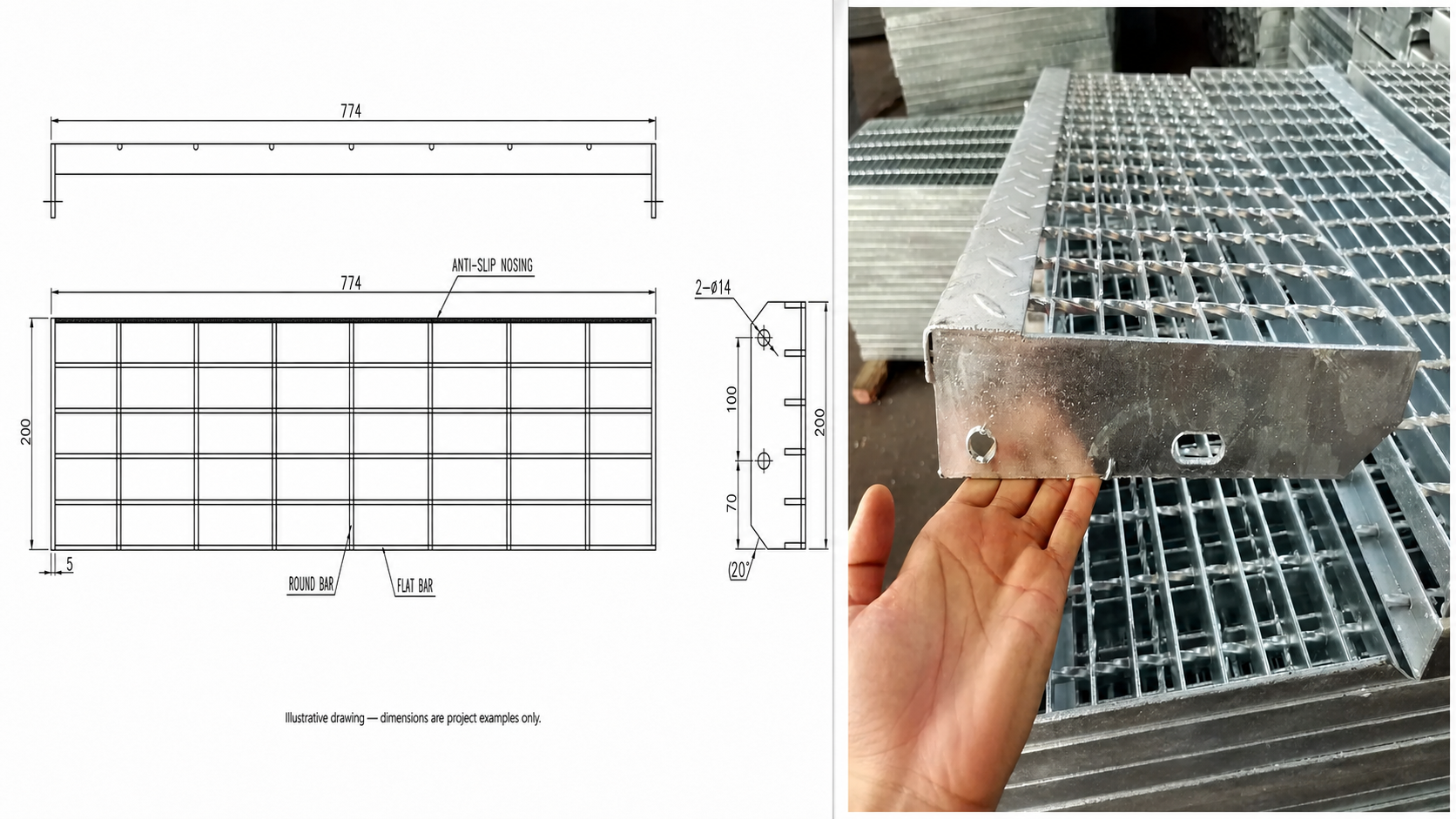
A steel grating submittal pack should let the buyer, engineer and fabricator review the same controlled information. At minimum, it should identify the product, panel marks, construction, bearing direction, supports, finish, fixing scope, drawing revision and every item that still needs project approval. A catalog page alone is not a submittal, and a shop drawing alone does not prove load capacity or compliance.
The example below pairs a privacy-safe QY drawing with a real QY steel grating stair tread. Its dimensions illustrate how information can be marked; they are not standard sizes for another project.
Start with the approval question
Before collecting files, state what the reviewer is being asked to approve. It may be product construction, panel geometry, finish, supports, fixing accessories, a stair tread layout or a complete supply package. Mixing all of these into an unlabeled PDF makes comments difficult to close.
Use one cover record with the project reference supplied by the buyer, package title, supplier, submission purpose, revision, date and document list. Mark each item as submitted, revised, approved, approved with comments or held. If a value is unknown, label it as unknown instead of filling the gap from a similar project.
Put six controlled records in one package
| Record | What the reviewer should see | What still needs confirmation |
|---|---|---|
| Product data | Grating construction, material, finish, bearing-bar and cross-bar description | Controlled specification, grade, coating system and acceptance criteria |
| Panel schedule | Panel mark, quantity, finished size and bearing direction | Site openings, clearances, support seats and matching marks |
| Shop drawing | Supports, cutouts, banding, nosing, side plates and fixing locations | Latest structural/background drawing and revision coordination |
| Load and span input | Load case, clear span, support direction and requested deflection criterion | Project engineer's design basis and approval |
| Accessories and finish | Clips, fasteners, nosing, toe plate, banding and coating scope | Material compatibility, installation method and repair procedure |
| Revision record | Comment, owner, response and changed drawing reference | Final approval status and release authority |
For product selection, start with steel bar grating. Keep structural inputs with the steel grating load and support-span guide rather than copying an isolated value into a new document.
Read the drawing as an example, not a standard
The illustrated tread drawing shows the kind of information a reviewer can trace: overall length and depth, nosing, bearing and cross-bar arrangement, side plate, hole quantity and hole position. A useful panel drawing applies the same discipline to bearing direction, supports, cutouts, banding and panel marks.
Do not reuse the shown dimensions for another stair. The buyer's opening, stringer, support, load, finish and fixing requirements control the actual detail. The photograph confirms that QY has a real grating tread reference; it does not prove that the photographed item matches a new project's drawing or approval requirements.
For access panels, coordinate mark, clearance, retention and handling through the removable steel grating panel detailing guide.
Separate supplier inputs from project approvals
QY can organize the product and fabrication information available for quotation and drawing review. The buyer or project team must supply the controlled project specification, current background drawings, design loads, support conditions, applicable standards and approval authority.
Keep these boundaries visible:
- A product photo is evidence of product form, not a dimensional inspection record.
- A marked example drawing is evidence of drawing practice, not a universal standard detail.
- A load table entry is not usable until construction, span, load case, units and criterion match the project.
- A supplier review does not replace structural, safety or regulatory approval by the responsible project party.
When a requirement is not documented, record it as a buyer-confirmation field. This is faster and safer than allowing different teams to work from different assumptions.
Close revisions before quotation or release
Use one comment log. Each comment should name the affected sheet or record, the required action, the response owner and the revision that closes it. Cloud folders and email attachments are useful only when everyone can identify the current file.
Before quotation, confirm the supply scope, quantity, panel marks, dimensions, construction, finish, accessories, packing and destination. Before production release, confirm that the approved drawing and specification revision agree. If comments change supports, cutouts, fixing or finish, return the package for review instead of relying on a verbal instruction.
Send QY the current specification, background drawings, panel schedule, loads/supports, finish, fixing scope and comment log through the contact page. QY can then identify missing inputs and prepare the quotation or drawing-review package without treating unapproved assumptions as facts.
Related links
Related products and RFQ guides
- Steel grating productsOpen the related product family section.
- Steel grating topic entrySteel grating family page for platform grating, stair treads, drain covers, serrated grating, galvanized grating and drawing-based RFQs.
- Galvanized steel gratingRelated product or guide page.
- Steel grating stair treadsRelated product or guide page.
- Steel Grating RFQ Checklist for International BuyersRFQ checklist for steel grating buyers covering application, panel or opening size, bearing bar direction, support span, finish, quantity, packing, destination and drawings.
- FRP Grating vs Galvanized Steel Grating for Wet AreasComparison guide for wet or corrosive area grating selection, covering FRP grating and galvanized steel grating by environment, traffic, support, cutouts and quotation details.


